 DashFox
First, ask the store how long and text the customer. If the wait will wreck the order's pay, you can unassign before pickup from the Help menu. [1]
But DoorDash says unassigning counts against your completion rate (you need 90%) unless the app marks the unassign as "worry-free". So check what the app says before you tap. [1] [3]
What a wait does to your hourly
The pay on an offer is fixed. Every extra minute at the counter spreads it thinner.
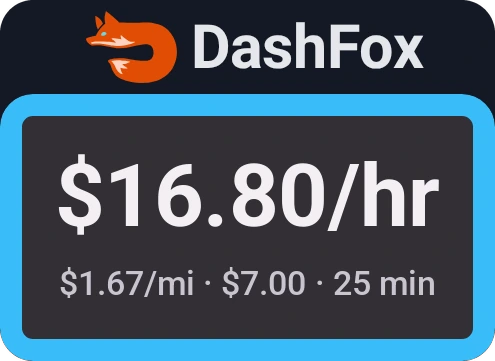
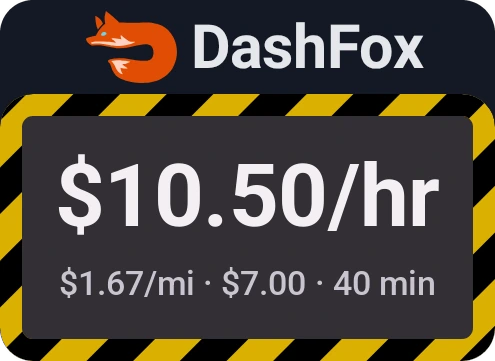
A made-up offer, shown the way DashFox would display each version. Example data.
Same order, same pay. A 15-minute wait took it from $16.80 an hour to $10.50. That's the number to keep in mind while you stand there: not "is $7 worth it?" but "is $7 still worth it for this much more time?"
The "deliver by" time on the offer already includes DoorDash's estimate of the store wait, along with driving and traffic. [3] A long wait means the store is running behind that estimate.
Step one: ask, then text
DoorDash's own advice is to ask the store directly for an estimated prep time, since support can't give you a better estimate than the store can. Experienced Dashers also text or call the customer to let them know about the delay. [1] A "5 more minutes" and a "they haven't started it" call for very different decisions.
What unassigning really costs
You can unassign from an order before you mark it picked up, right in the app. After pickup you'd have to contact support. [1] [2] The steps:
Pick the reason that fits
For a slow kitchen that's usually an issue with the store. [2]
Read the screen, then confirm
The app tells you what the unassign means. DoorDash's guide shows "Unassign with No Pay": you aren't paid for the order. [2]
The bigger cost is your completion rate: the share of your last 100 accepted orders that you finished. The minimum is 90%. [3] DoorDash says unassigning affects it, whether you do it yourself or through support, unless the app marks it "worry-free". Unassigns for reasons truly outside your control, like an emergency, can be excused. [3]
In plain terms: across your last 100 accepted orders, you have room for about ten that don't count as completed. Every one you spend on a slow kitchen moves you closer to the line, and each one only drops off as newer orders come in. [3]
What about the "no penalty after 10 minutes" rule?
Plenty of Dashers say that after a long enough wait, the store-issue option in the app offers an unassign that doesn't count against you. [5] DoorDash's help center doesn't publish a fixed number of minutes, so treat "10 minutes" as a rule of thumb, not a guarantee. The app's own wording is what counts. If it says worry-free or no impact on your completion rate, that's your green light. If it doesn't say so, assume it counts.
The protections you already have
- Your customer rating. DoorDash automatically removes ratings under 5 stars when the cause was a long wait at the restaurant. [3]
- Your on-time rate (some Dashers). Where "merchant delay protection" shows on your pickup screen, store delays don't count against your on-time rate, as long as you arrive on time, stay at the store, pick up as soon as it's ready and leave right after. [3]
- A closed store isn't an unassign. If the store is actually closed, don't unassign: report it in the app after you arrive. That doesn't hurt your completion rate, and DoorDash pays you for the work you did. Reporting an open store as closed counts as fraud. [4]

About tapping "Arrived" early: some Dashers swipe Arrived before they're at the store to start the clock sooner. We don't recommend it. DoorDash's merchant delay protection depends on you actually arriving on time and staying at the store, so the app's record should match what really happened.
Wait or unassign? A quick way to decide
- How long, really? Get the store's estimate. Add it to the time the order still needs.
- What's the new hourly? Pay × 60 ÷ total minutes. If it's still above your floor, wait.
- Is the app offering a worry-free unassign? If yes and the new hourly is bad, unassigning costs you only the time already spent.
- If it isn't worry-free, weigh one of your ten against how bad the order has become. A $7 order sliding to $10.50 an hour is a different call from a $20 order that's merely running late.
New to the per-hour math? How to tell what a DoorDash offer pays per hour has a cheat sheet that makes step 2 take seconds.
Quick questions
Does unassigning a DoorDash order hurt my account?
It lowers your completion rate unless the app marks the unassign "worry-free" or DoorDash excuses it (for example, an emergency). Stay at 90% or above across your last 100 accepted orders. [3]
How long should I wait at a restaurant?
There's no official number. Ask the store for an estimate, then work out what the order pays per hour with the wait included. If it's below what your time is worth and the app offers a worry-free unassign, it may be time to go.
Do I get paid if I unassign?
No. DoorDash's guide shows the option as "Unassign with No Pay". [2] A closed store is different: report it and you're paid for the work you did. [4]
Can I unassign after I've picked up the food?
Not in the app. Once you've marked the order picked up, you have to contact support, and it still affects your completion rate. [1] [2]
Will a late delivery from a slow restaurant hurt my rating?
DoorDash removes customer ratings under 5 stars caused by long restaurant waits. Where merchant delay protection appears, store delays also don't count against your on-time rate if you followed its conditions. [3]
Keep reading
 On the job · Pickup problems · November 19, 2026
DoorDash restaurant closed? Check the pickup before you report it.
A locked lobby is not always a closed store. Check pickup access, current-photo reporting and the pay result—not an automatic half-pay rule.
 Getting started
Your first DoorDash delivery
Check the order, read the customer notes and follow the correct completion steps.
 Ratings & rewards
Does your DoorDash acceptance rate matter?
Declining and unassigning affect different ratings. Check the Rewards trade-off before protecting a percentage.
 Offer math
How to tell what a DoorDash offer pays per hour
Three quick mental-math tricks and a cheat sheet you can screenshot.
 On the job
DoorDash alcohol delivery: what actually happens, step by step
The ID scan, the checks, and what to do when you can't hand it over.
Sources
- DoorDash Help: There is a long wait at the restaurant. Ask the store for prep time, contact the customer, unassign steps, after-pickup unassigns, completion rate impact. Accessed October 25, 2026.
- DoorDash Help: How can I unassign myself from an order? Reasons including "Issue with store", "Unassign with No Pay", support after pickup. Accessed October 25, 2026.
- DoorDash Help: Dasher Ratings Explained. Completion rate (last 100, 90% minimum, "worry-free" unassigns, excused unassigns), rating removal for long restaurant waits, merchant delay protection, what the deliver-by time includes. Accessed October 25, 2026.
- DoorDash Help: How to report a closed store. Accessed October 25, 2026.
- r/doordash: "Are Dashers compensated for restaurant delays?" Dashers describing a no-penalty unassign option after a long wait. Community reports, not DoorDash policy.
The offer in this article is a made-up example. DoorDash's app and rules change; what your Dasher app shows is the final word.