 DashFox
Judge the whole stack like one offer: total pay ÷ total minutes × 60, and total pay ÷ total miles. These are gross projections before costs, not a promise of your final shift rate. Check pickup waits, the route and any extra drive after the last drop.
For an Add to Route offer, compare its added pay with the extra minutes and miles it adds, then recheck whether the remaining route and delivery times still work.
How stacks happen
DoorDash calls them batched offers, and there are two ways to get one: [1]
- One offer with two or more orders on the offer screen.
- "Add to Route": a new offer that pops up while you're on your way to pick up the first one.
The app suggests an order to do the stops in, but you can use your own judgment. [1] There's also a bigger version, the routed delivery: three to ten drop-offs from one pickup, with the estimated completion time and guaranteed pay for the whole route shown up front. [2]

DoorDash says stacks often come from the same restaurant and let you finish two or more orders in less time than usual. [1] That's the good version. Your job is to spot the other kind.
Two stacks, different trade-offs
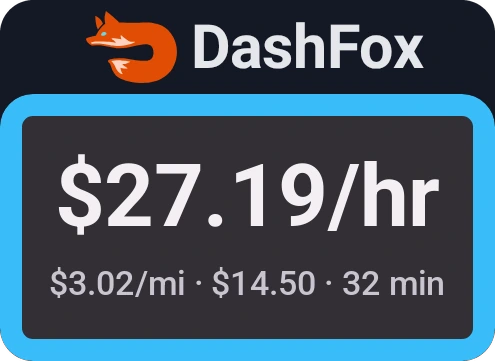
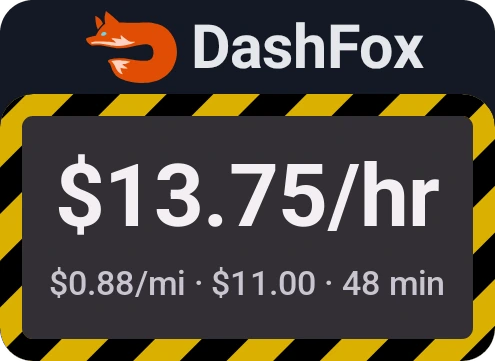
Two made-up stacks as DashFox would show them. Example data.
In these examples, the first is one pickup and two nearby drops: $27.19 an hour gross and $3.02 a mile. The second has two stores in different directions: $13.75 an hour gross and 88 cents a mile. Those time estimates matter as much as the payouts.
Now suppose you budget a hypothetical 76¢ per mile for the vehicle. Here's what that assumption leaves before taxes and other expenses:
$14.50 / 4.8 miles
4.8 × $0.76 ≈ $3.65 of assumed vehicle budget. About $10.85 remains for a 32-minute trip.
$11.00 / 12.5 miles
12.5 × $0.76 = $9.50 of assumed vehicle budget. $1.50 remains for a 48-minute trip.
76¢/mile is the IRS optional business mileage deduction rate for July–December 2026—not a measurement of your car's expenses, a reimbursement or proof of profitability. [4] Replace the illustrative budget with one based on your own vehicle records.
Judging an "Add to Route" offer
Compare what the add-on changes: extra pay, extra pickup wait, extra driving and another handoff. Don't assume a displayed total-route ETA is the same as the add-on's extra time. Recheck your existing deliveries too.
You're heading to pick up an order. An Add to Route offer adds $5.00. After comparing the route before and after, you estimate that the added pickup and drop will cost 12 extra minutes and 2 extra miles.
That's a manual incremental comparison—not your new whole-route hourly rate. If the added work takes 25 minutes instead, the same $5 works out at $12/hr gross. Allow for costs and the effect on the deliveries you've already accepted.
Ratings, pay and return rules
- On-time rate: batched orders count as a single offer for your on-time rate. [3]
- Customer ratings: DoorDash automatically removes ratings under 5 stars when a delivery was late because orders were batched together. [3]
- Peak Pay: when it's on, it may be paid per single delivery or per batch. [1]
- Earn by Time: you're paid from accepting the first order until you drop off the last. [5]
- Routed delivery no-show: call and text first. If you still can't reach the customer, mark Customer Unavailable and follow the timer and return instructions. Finish the other drops before the return; DoorDash says you receive earnings for that return trip. Don't leave routed merchandise unattended. [2]
A quick stack checklist
- Same pickup? One restaurant can save a stop, but a long wait can erase that saving.
- Where are the drops? Check the actual route; opposite directions may add substantial driving, but not a fixed multiplier.
- Worth the time and costs? Check total gross $/hour and $/mile, your vehicle budget and the drive after the last drop.
- Can you handle everything properly? Follow pickup and delivery instructions, keep hot and cold items separate, and allow for temperature-sensitive groceries as well as prepared food. [3]
Not sure of the numbers? Our offer calculator works for stacks too: just enter the totals.
Quick questions
Are stacked orders worth it on DoorDash?
Compare total pay, estimated minutes, total miles and your vehicle costs. One pickup can save a stop, but that doesn't guarantee a better result. A long wait or an awkward final destination can change the decision.
How do I add an order to my route?
While you're heading to your first pickup, an offer may pop up with an "Add to Route" button. Tap it to take both. [1]
Do stacked orders hurt my ratings?
Batched orders count as one offer for on-time rate, and DoorDash removes sub-5-star ratings caused by batching delays. [3]
What's a routed delivery?
A group of three to ten orders from one pickup with drops along a route. The offer shows the estimated completion time and guaranteed pay for the whole route. [2]
Keep reading
 Plan your dash
Multi-apping DoorDash and Uber Eats
A platform-managed batch isn't the same as combining unrelated accepted jobs across apps.
 Where to wait
DoorDash Hotspots vs Peak Pay
Check whether an incentive is per delivery or batch, and which starting point applies.
 On the job
Are DoorDash grocery orders worth it?
Shopping, substitutions and checkout belong in the time budget too.
 Offer math
Should you take $4 DoorDash orders?
Similar payouts, different time and mileage. Check gross rates and your own vehicle budget.
 Free tool
DoorDash offer calculator
Pay, minutes and miles in; $/hour and $/mile out.
Sources
- DoorDash Help: Why did I receive multiple offers at once? Batched offers, Add to Route, suggested stop order and Peak Pay on batches. Checked October 31, 2026.
- DoorDash Help: Routed Deliveries. 3–10 drop-offs, whole-route time and pay, contact attempts and returns. Checked October 31, 2026.
- DoorDash Help: Dasher Ratings Explained. Batched orders and on-time rate, batching-delay rating exclusions, hot/cold handling guidance. Checked October 30, 2026.
- IRS: Standard mileage rates. Optional business deduction rate: 76¢/mile for July 1–December 31, 2026. Checked October 30, 2026.
- DoorDash Help: Earn by Time mode. Active time for batched offers, from first acceptance through completion. Checked October 29, 2026.
The stacks, add-on and vehicle-budget calculations are constructed examples, not typical earnings or measured expenses. The add-on comparison is manual arithmetic, not a claim that DashFox automatically isolates marginal time. The IRS deduction rate is not a personal cost measurement or tax advice.