 DashFox
A grocery offer is worth considering when its payout covers the full job at a rate that works for you. Check whether the instructions call for pickup or shopping, allow for checkout and substitutions, then compare gross pay per hour and per mile. There isn't one grocery-store name or payout that guarantees a good offer.
DoorDash's Shop & Deliver process is shop, pay with the Red Card, then deliver. The payment amount appears on the acceptance screen. [1] The shopping time belongs in your estimate, not on top of a drive-only estimate.
First question: are you picking up, or shopping?
Pickup-only instructions
If the job says to collect an already-prepared order, budget for getting to the store, locating the pickup, any wait, loading, driving and the final handoff. Prepared bags don't mean a zero-minute pickup.
Shop & Deliver
DoorDash says you find the customer's items, proceed to checkout, pay with the Red Card and deliver. [1] Budget for the aisles, missing items and checkout as well as the trip.
Read the task shown in your app rather than assuming every order from a particular chain works the same way. Don't accept an offer merely to investigate details you couldn't see beforehand; judge the information available and allow for uncertainty.
The same $12 can mean two very different hours
You estimate 25 minutes for a $12 grocery job, from accepting through the handoff, over 4 miles. That projects to $28.80/hr gross. Now imagine finding replacements and waiting at checkout adds 15 minutes. With the same payout and miles, a 40-minute job works out at $18/hr gross.
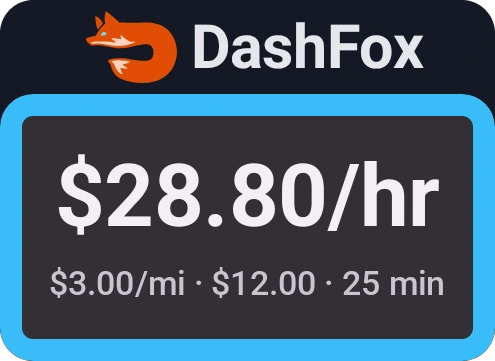
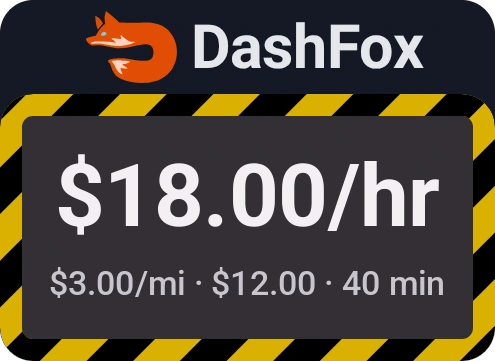
Example data. Two time assumptions for the same made-up $12 / 4-mile offer—not measured grocery averages or a forecast of a particular store.
If your personal target were $24/hr gross, $12 would buy a 30-minute total time budget. A 40-minute version misses that target, even though its $3 per mile looks strong. Your own target, vehicle costs and destination still matter.

Try a slower scenario before deciding. Our offer calculator lets you change minutes while keeping pay and miles fixed. It shows the gross projection, not stock availability, checkout queues or take-home profit.
A larger payout isn't automatically a better hourly rate
DoorDash says Shop & Deliver has higher average payouts per order than restaurant delivery, with actual earnings varying by factors including time, location and expenses. [1] That isn't a claim that every shopping offer pays more per hour. You still need to know how much work fits inside that payout.
The acceptance screen shows a guaranteed minimum for the completed offer; final earnings can be higher. DoorDash's pay model includes base pay, tips and applicable promotions. [2] Make the decision on the amount shown, not an extra tip you hope will arrive.
What to look for before accepting
- The job type. Are you collecting bags or finding the items yourself?
- The shopping work you can see. Review available item and quantity information. A bulky or varied list can require more handling than the headline count suggests; don't assume ten items means ten quick grabs.
- Your store familiarity. If you don't know the layout or pickup process, don't budget as if you do.
- The whole route. Include getting to the store, parking, loading, the drop and any extra travel afterward. A short customer leg is not the whole job.
- The handoff effort. Where visible, consider bulky loads, access instructions and whether you can safely carry the order. Allow for unknowns rather than assuming a doorstep beside your car.
These are planning checks, not fixed minutes to add to every order. A familiar store and a short list can work well; an unfamiliar layout or a difficult substitution can change the result.
Missing items: follow the substitution flow, not a guess
DoorDash's US shopping guide gives this sequence: [1]
- Check with store staff if you can't find an item, then mark it unavailable if it's out of stock.
- Use an available, customer-preapproved substitute when the app offers one.
- If none is preapproved, contact the customer using the app's text/call option. Add an agreed replacement or follow the refund flow.
- If there's no response before checkout, DoorDash's guide says to mark it unavailable and issue a refund. If substitutions aren't enabled, follow the app's unavailable/confirm steps instead.
That communication is real work. Include room for it in your time estimate; don't silently substitute a different product just to preserve an optimistic hourly projection.
Red Card trouble is checkout time too
Shop & Deliver uses a DoorDash-funded Red Card; it isn't the payout card for your earnings. [3] Follow your app's payment instructions. If it declines, DoorDash says to check the items, quantities and exact weights, then use Help → Red Card Declined and follow the self-help flow; contact Support if it still fails. [4]
This is not a reason to assume a fixed checkout delay on every order. It's a reason to leave some margin, especially while you're learning a store, rather than treating the fastest possible trip as certain.
Quick questions
Do I have to shop for every DoorDash grocery order?
Check the task instructions. Shop & Deliver explicitly includes finding the items, checkout and delivery. [1] If your order instead instructs you to collect prepared bags, budget for that pickup and handoff—not a shopping list you weren't assigned.
Are grocery orders better than restaurant orders?
Not automatically. DoorDash's higher-average-payout statement is per order, not a guarantee about your hourly rate. [1] Compare the entire job's time, distance, handling and costs.
What if the customer doesn't answer about a substitution?
DoorDash's US guide says to mark the item unavailable and issue a refund if the customer hasn't responded before checkout. Follow the app's prompts, including any store-specific limits on substitutions. [1]
Can the offer calculator account for shopping?
You can enter a total time estimate that includes shopping, replacements, checkout and delivery. The calculator doesn't predict those delays for you; changing the minutes simply lets you compare scenarios.
Keep reading
 On the job · Checkout problems · November 18, 2026
DoorDash Red Card declined? Check before you pay yourself.
A checkout checklist, the right help path and what an itemized receipt can—and cannot—do for reimbursement.
 Plan your dash
Best times to DoorDash: test your market
Pick a workable window and compare full-shift results—not just higher payouts per order.
 Offer math
DoorDash stacked orders: when is a double worth it?
Compare the full route and the extra work an add-on adds.
Sources
- DoorDash Help: What is DoorDash Shop & Deliver? Shopping steps, acceptance-screen pay, the per-order payout comparison and its limitations, and unavailable-item/substitution instructions. Checked November 1, 2026.
- DoorDash Help: How Dasher Pay Works. Base pay, tips, promotions and the acceptance-screen minimum guarantee. Checked November 1, 2026.
- Dasher Central: How does grocery delivery work on DoorDash? Shop/pay/deliver workflow and DoorDash-funded Red Card. Checked November 1, 2026; article dated May 7, 2024.
- DoorDash Help: My Dasher Red Card was declined. Item/quantity/weight checks, Red Card Declined self-help and Support. Checked November 1, 2026.
The $12 offer and both time scenarios are constructed examples, not measured store performance, typical earnings or a promise. Figures are gross offer-level arithmetic before vehicle costs, taxes and time between offers. App instructions and store processes can change; follow the current prompts for your order.