 DashFox
Check for a zone-switch offer before assuming you must restart or drive all the way back. DoorDash offers switching after a drop-off into a different zone that is busy. If you keep your original zone, its guidance says the app looks for offers along your return route. Looking is not a guaranteed order. [1] [2]
Review the screen while safely stopped. Compare your remaining time, the route home and actual app availability—not just the colour of an area.
Two different choices after the drop-off
Switch, if offered
Confirming the switch keeps your current dash running and moves future offers to the new zone. Check its Peak Pay and, in Earn by Time, its active hourly rate. The rate for future offers can change. [1]
Keep your original zone
You can decline the zone switch. DoorDash says the app will look for offers that take you back toward your original zone. That is not a promise of a paid trip home or a reason to count an offer you have not received. [1]
Your earning mode changes the switch limit
DoorDash's switching guide allows one switch per dash in Earn per Offer. In Earn by Time, you can switch again whenever the option is available and the new zone is busy. Do not treat those as the same rule. [1]
Read the new incentive before confirming. The guide says a confirmed switch replaces your old zone's Peak Pay with the new zone's available offer. Simply dropping off across a boundary is not the same action. See our Hotspots and Peak Pay guide for the difference between demand and bonus terms. [1]
Do not end the dash just to refresh the map
Already switched and want your original zone back? In Earn per Offer, DoorDash describes ending your dash and starting another there if spots are available. In Earn by Time, returning to a busy original zone can bring up another switch option; otherwise a new session also depends on availability. [1]
Ending the current session does not reserve the next one. The Dash Now page says access can depend on equipment, vehicle, Rewards status and other factors. A grey area may offer scheduling instead. For new Dashers, a gold reserved zone has an app-shown delivery threshold—not one national number to memorise. [3] [4]
Dash Along the Way is a separate starting option
Before starting a dash elsewhere, select a nearby zone and use Dash Along the Way when available to hold a spot and look for orders en route. DoorDash's guide specifies a zone within a 1-hour commute when reserving. Check the displayed ETA: the guide says missing it can end that dash. [2]
That reservation flow is different from the automatic search for return-route orders after an out-of-zone delivery. The same FAQ says you can accept or decline along-the-way offers as usual; your earning mode's rules still apply. No delivery along either route is guaranteed. [2]
Price the return before the next offer, too
Example data: a $12.00 offer estimates 25 minutes and 6 miles. Its offer-only gross projection is $28.80/hr and $2.00/mi. That does not include an empty drive afterward.
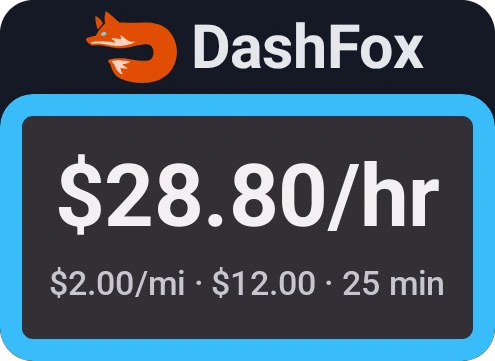
If you budget another 15 minutes and 4 miles with no new order, the same $12.00 covers 40 minutes and 10 miles: $12.00 ÷ 40 × 60 = $18.00/hr and $12.00 ÷ 10 = $1.20/mi, before car costs and taxes. The extra driving has not become paid time merely because you included it in your budget. Replace these assumptions with your actual route.
A quick check before you move
- Still on a delivery? Finish the actual job's required steps before treating yourself as available elsewhere.
- Switch shown? Read the zone, earning mode and new incentive. Do not assume another switch or an immediate restart will be available.
- Heading back? Budget empty miles and minutes. Reassess each real offer rather than planning around an order that might never arrive.
Quick questions
Must I get back inside my original zone before any offer can appear?
Not necessarily. The official guidance describes conditional switching into a busy drop-off zone and looking for offers along the route back if you do not switch. Neither guarantees an offer. Follow the choices on your current screen. [1] [2]
Does a higher Peak Pay number nearby automatically apply to me?
Do not assume so. A confirmed zone switch and a delivery destination are different. The switching guide says the new zone's available Peak Pay replaces the old one after you switch; read the actual incentive and earning mode. [1]
Keep reading
DoorDash Hotspots vs Peak Pay: where should you wait?
How dynamic and historical Hotspots differ, how to read Peak Pay units and eligibility, and how recorded offer-rate maps differ from current order demand.
Is DoorDash worth it after gas? Count the miles home, too.
Work out DoorDash gas cost per mile, budget for wear and unpaid return driving, and separate a vehicle-cost allowance from taxes. One labelled $12 example.
Sources and limits
- Switching Zones: busy-zone eligibility, mode-specific limits, continued sessions, return options and incentive changes.
- Dash Along the Way: reservation, 1-hour commute, ETA, return-route search and offer choices.
- New Dasher: Navigating Reserved Zones: zone colours and app-specific delivery thresholds.
- How to use the Dash Now home page: availability, eligibility factors and scheduling.
General US guidance; sources checked November 23, 2026. Menus, availability and incentives can vary. The offer and return trip are constructed Example data, not a recorded route or typical earnings. The checklist is practical advice, not an extra DoorDash rule. No order, paid return, future slot or earnings outcome is promised. DashFox does not switch DoorDash zones or control its routing.