 DashFox
Neither mode is a universal winner. Earn by Time pays a guaranteed rate for active delivery time, including merchant waits, plus tips and applicable promotions—not for time waiting for the next offer. DoorDash also says tips may be less frequent in this mode. [1]
Earn per Offer gives you more flexibility to choose individual offers. Compare completed shifts using total gross pay ÷ total dash time, then consider miles and costs. A slow kitchen can change one order's arithmetic without proving Earn by Time wins your whole shift.
How each mode pays
Earn per Offer
Each offer shows minimum guaranteed pay, including base pay and customer tips; final earnings may be higher. [3] What that offer pays per hour depends on its actual duration.
Earn by Time
A guaranteed rate for active time: from acceptance until completion, including merchant waits. You keep 100% of tips and applicable promotions on top, but tips may be less frequent. [1]
One thing is the same in both: waiting for the next offer isn't paid. DoorDash splits your dash into active time (on an order) and idle time (waiting for one). Earn by Time only pays the active part. [1] [2]
Check your actual rate and availability in the app; Earn by Time is offered in select US cities, not guaranteed to every Dasher. The base active-hour rate is normally locked for that dash, with a zone-switch exception. Peak Pay applies only during its incentive period, so a temporary boost isn't the rate for the entire evening. [1] [2]
Imagine a 90-minute dash: 60 minutes actively delivering and 30 waiting for offers. At an assumed $14 per active hour, base pay is $14. Add $4 in tips and the session totals $18.
That's before vehicle costs and taxes. The $14 active-hour rate wasn't a promise of $14 for every hour online. These are made-up session numbers, not observed earnings.
The Earn by Time rules that catch people out
- One combined allowance. DoorDash permits one decline or unassign per hour. A second within the same hour means you can't continue that Earn by Time session; the app offers ending the dash or continuing in Earn per Offer. It is not one decline plus a separate unassign allowance. [1]
- Letting the timer run out counts. An offer that times out counts as your decline for the hour. [1]
- Declines still hit your acceptance rate. Every decline in Earn by Time counts toward it. [1]
- Unassigning isn't paid waiting. DoorDash says you generally aren't paid for time on an offer you unassign, and the unassign counts toward the hourly allowance and completion rate. A customer- or merchant-cancelled order is different: the published rule pays active time up to cancellation without affecting completion rate. [1]
- Switching back takes an hour. Leave Earn by Time for Earn per Offer and you must wait at least an hour to start another Earn by Time dash. [1]
- Lateness can lock you out. Repeated late pickups or drop-offs can cost you access to the mode for a while. [1]
- No priority access. The Dasher Rewards perk of priority access to high-paying offers is switched off while you earn by time, though DoorDash says some high-paying offers still come through. [1]
There is an active-order exception: declining an additional offer while already completing one doesn't use the hourly decline allowance. [1] Check the actual app prompts rather than assuming every type of decline has the same consequence.
Don't deliberately stretch a delivery to increase active-time pay. DoorDash lists delaying pickup, failing to leave a merchant promptly and failing to mark completion on time among conduct that can lead to withheld payment or deactivation. [1]
Two orders, two modes
For the arithmetic below, assume $14 per active hour, the rate in DoorDash's own example—not a quoted rate for your city. [1] We hold the assumed duration and tip equal across the two calculations to isolate base pay. Real offers, tips and assignment mix can differ between modes; these scenarios aren't predictions or matched real deliveries.
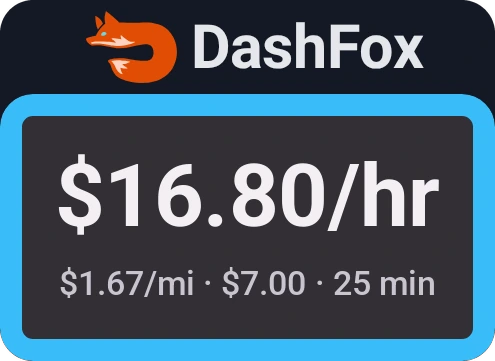
A $7.00 offer comes in: 4.2 miles, due in 25 minutes. Say $3 of that is the tip. On paper that's $16.80 an hour. Then the kitchen is backed up and you wait 15 extra minutes. The job takes 40.
Earn per Offer: $7.00
The pay was fixed, so 40 minutes works out to $10.50/hr.
Earn by Time: $12.33
40 active minutes at $14/hr is $9.33, plus the $3 tip.
Under these assumptions, the time-based calculation is $5.33 higher. The extra merchant wait is active time. That doesn't establish the mode's full-shift result or promise an identical tip on a real Earn by Time offer.
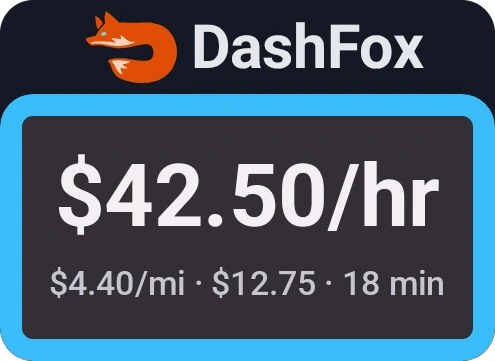
Now suppose an Earn per Offer job pays $12.75 for 2.9 miles and takes 18 minutes. Assume $6 of that is the tip, and use the same assumed tip and duration for a time-based calculation.
Earn per Offer: $12.75
18 minutes, so $42.50/hr.
Earn by Time: $10.20
18 active minutes at $14/hr is $4.20, plus the $6 tip.
Here the per-offer calculation is $2.55 higher. That's a result of these inputs, not proof that every busy shift favours Earn per Offer. Any time spent waiting between jobs still belongs in the session comparison.
Compare full sessions, not the headline rate
Our suggestion: try repeated, reasonably comparable sessions in the same area and time window, where both modes are available. Don't switch repeatedly just to run a quick test; the published switch-back wait still applies.
- Record the whole clock. Keep total dash time, active time and idle time separate. Divide all gross session pay by total dash time for both modes, not active time for one and total time for the other.
- Keep tips and incentives visible. Note base pay, tips and promotions separately. Don't assume the tip mix or a temporary Peak Pay period will repeat.
- Count the driving cost. Record miles and relevant vehicle expenses, including an unpaid return where needed. A higher gross hourly rate isn't automatically higher take-home pay.
To turn an offer into an hourly figure fast, use the multiplier trick: 20 minutes is ×3, 30 minutes is ×2. Our guide How to tell what a DoorDash offer pays per hour has the full cheat sheet.

One night is a clue, not a verdict. Compare several completed sessions and note different traffic, waits or incentives. Your log can guide your choice; it isn't a controlled earnings study or proof of what other Dashers will make.
Where DashFox fits
For an Earn per Offer decision, DashFox shows $/hour and $/mile the second an offer pops up, so you can take it or skip it before the timer runs out.
That offer projection is not directly comparable to an Earn by Time base rate with tips still to come. DashFox's figures use the offer's pay and timing; they don't add an unplanned wait, idle time or a drive back, and they don't subtract gas, wear or taxes. We are not presenting the bubble as an Earn by Time payroll display or an automatic mode recommendation.
Quick questions
Is Earn by Time better than Earn per Offer?
Neither wins everywhere. Earn by Time covers active delivery minutes, including merchant waits, but not idle time between offers, and tips may be less frequent. Compare repeated completed sessions using total dash time, gross pay and vehicle costs—not just an active-hour headline. [1]
Do you keep tips on Earn by Time?
You keep 100% of tips, plus applicable promotions, on top of active-time base pay. DoorDash cautions that tips may be less frequent in this mode; keeping all tips is not a promise of an equal tip total across modes. [1]
How many offers can you decline on Earn by Time?
The published allowance combines declines and unassigns: one per hour, with timeouts counting too. Declining an extra offer while already active on another is an exception. A second counted decline/unassign within the same hour means ending Earn by Time or continuing in Earn per Offer. [1]
Does Earn by Time pay while you wait for orders?
No. It pays for active time, from accepting an offer to dropping it off, including waits at the restaurant. Time spent waiting for the next offer isn't paid. [1]
What is the Earn by Time rate?
Check the app for your rate and availability. The base rate can vary by location/time before starting and is normally locked during the dash, with a zone-switch exception. Temporary Peak Pay expires with the incentive period. DoorDash's $14 example is not a national rate. [1]
Keep reading
Sources
- DoorDash Help: Earn by Time mode. Active/idle/dash time, example rate, tips, availability, decline/unassign limits and exceptions, cancellations, switching, incentives and access/payment risks. Checked November 7, 2026.
- Dasher Central: Earn by Time mode, explained. Active time versus total dash time, offer details and the zone-switch rate exception. Page dated September 4, 2026; checked November 7, 2026.
- DoorDash Help: Redesigned Accept Modal. Offer-screen minimum guaranteed pay and deliver-by information. Checked November 7, 2026.
All scenarios, offers, tips and timings are constructed Example data, rounded to the cent. Equal assumed tips/durations isolate arithmetic; real assignment and tip mixes may differ. The $14 active-hour rate is DoorDash's example, not your local rate. Rates shown are gross, before costs/taxes. Actual availability and job-specific app instructions control; nothing here establishes a universal winner or promises earnings.